
13 posts tagged with "buildbarn"

View All Tags

Buildbarn Block Sizes

· 3 min read
Benjamin Ingberg
Benjamin Ingberg

When starting out with remote caching, an error you are likely to run into is:

java.io.IOException: com.google.devtools.build.lib.remote.ExecutionStatusException:
INVALID_ARGUMENT: Failed to store previous blob 1-<HASH>-<LARGE_NUM>:
Shard 1: Blob is <LARGE_NUM> bytes in size,
while this backend is only capable of storing blobs of up to 238608384 bytes in size

This is because your storage backend is too small. You are attempting to upload a blob larger than the largest blob accepted by your storage backend.

How do I fix it?​

The largest blob you can store is the size of your your storage device divided by the number of blocks in your device.

To store larger blobs, either increase the size of your storage device or decrease the number of blocks it is split into. Larger storage devices will take more disk, while fewer blocks will decrease the granularity which your cache works with.

In bb-deployments this setting is found in storage.jsonnet.

{
// ...
contentAddressableStorage: {
backend: {
'local': {
// ...
oldBlocks: 8,
currentBlocks: 24,
newBlocks: 1,
blocksOnBlockDevice: {
source: {
file: {
path: '/storage-cas/blocks',
sizeBytes: 8 * 1024 * 1024 * 1024, // 8GiB
},
},
spareBlocks: 3,
},
// ...
},
},
},
// ...
}

To facilitate getting started bb-deployments emulates a block device by using an 8GiB large file. This file is small enough to fit most builds while not taking over the disk completely from a developers machine.

The device is then split into 36 blocks (8+24+1+3), where each block can then store a maximum of 238608384 bytes (8GiB / 36 - some alignment).

In production it is preferable to use a large raw block device for this purpose.

What does new/old/current/spare mean?​

In depth documentation about all the settings are available in the configuration proto files.

In essence the storage works as a ringbuffer where the assignment of each block is rotated. Consider a 5 block configuration with 1 old, 2 current, 1 new and 1 spare block.
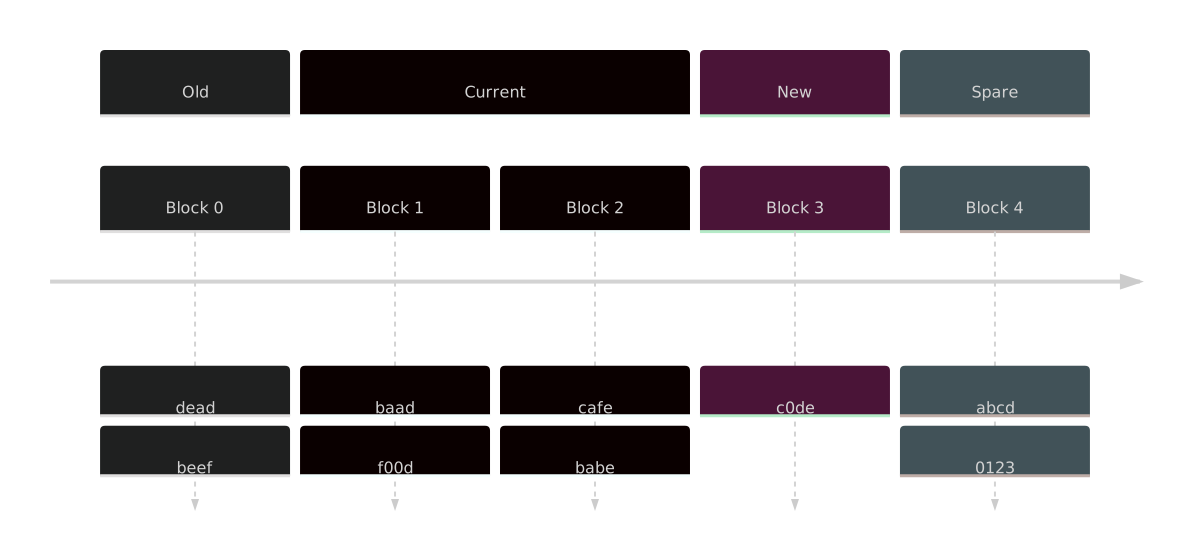
diagram

As data is referenced from an old block it gets written into a new block. When the new block is full the role rotates.
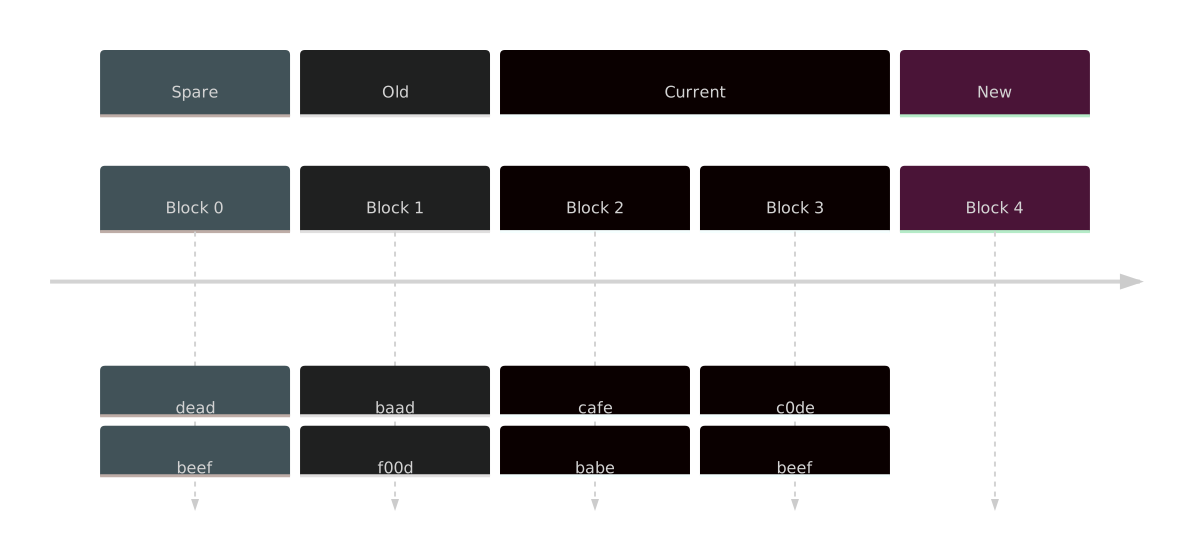
diagram

There are some tradeoffs in behaviour to consider when choosing your block layout. Fewer blocks will allow larger individual blobs at the cost of granularity. Here is a quick summary of the meaning of the different fields.

  • Old - Region where reads are actively copied over to new, too small value and your device behaves more like a FIFO than a LRU cache, too large and your device does a lot of uneccesary copying.
  • Current - Stable region, should be the majority of your device.
  • New - Region for writing new data to, must be 1 for AC and should be 1-4 for CAS. Having a couple of new blocks allows data to be better spread out over the device so as to not expire at the same time.
  • Spare - Region for giving ongoing reads some time to finish before data starts getting overwritten.

Updates to Buildbarn deployment repo as of Febuary 2023

· 4 min read
Benjamin Ingberg
Benjamin Ingberg

The example configuration project for buildbarn bb-deployments has gotten updates.

This is a continuation of the updates from last year article and is a high level summary of what has happened since April 2022 up to 2023-02-16.

Let ReferenceExpandingBlobAccess support GCS​

ReferenceExpandingBlobAccess already supports S3 so support was extended to Google Cloud Storage buckets.

Support for prefetching Virtual Filesystems​

Running workers with Fuse allows inputs for an action to be downloaded on demand. This significantly reduces the amount of data that gets sent in order to run overspecified actions. This however leads to poor performance for actions which reads a lot of their inputs synchronously.

With the prefetcher most of these actions can be recognized and data which is likely to be needed can be downloaded ahead of time.

Support for sha256tree​

Buildbarn has added support for sha256tree which uses sha256 hashing over a tree structure similar to blake3.

This algorithm will allow large CAS objects to be chunked and decompositioned with guaranteed data integrity while still using sha256 hardware instructions.

Completeness checking now streams REv2 Tree objects​

This change introduces a small change to the configuration schema. If you previous had this:

backend: { completenessChecking: ... },

You will now need to write something along these lines:

backend: {
completenessChecking: {
backend: ...,
maximumTotalTreeSizeBytes: 64 * 1024 * 1024,
},
},

See also the bb-storage commit 1b84fa8.

Postponed healthy service status​

The healthy and serving status, i.e. HTTP /-/healthy and grpc_health_v1.HealthCheckResponse_SERVING, are now postponed until the whole service is up and running. Before, the healthy status was potentially reported before starting to listen to the gRPC ports. Kubernetes will now wait until the service is up before forwarding connections to it.

Server keepalive parameter options​

The option buildbarn.configuration.grpc.ServerConfiguration.keepalive_parameters can be used for L4 load balancing, to control when to ask clients to reconnect. For default values, see keepalive.ServerParameters.

Graceful termination of LocalBlobAccess​

When SIGTERM or SIGINT is received, the LocalBlobAccess now synchronize data to disk before shutting down. Deployments using persistent storage will no longer observe loss of data when restarting the bb_storage services.

Non-sector Aligned Writes to Block Device​

Using sector aligned storage is wasteful for the action cache where the messages are typically very small. Buildbarn can now fill all the gaps when writing, making storage more efficient.

DAG Shaped BlobAccess Configuration​

Instead of a tree shaped BlobAccess configuration, the with_labels notation allows a directed acyclic graph. See also the bb-storage commit cc295ad.

NFSv4 as worker filesystem​

The bb_worker can now supply the working directory for bb_runner using NFSv4. Previously, FUSE and hard linking files from the worker cache were the only two options. This addition was mainly done to overcome the poor FUSE support on macOS.

The NFSv4 server in bb_worker only supports macOS at the moment. No effort has been spent to write custom mount logic for other systems yet.

Specify forwardMetadata with a JMESPath​

Metadata forwarding is now more flexible, the JMESPath expressions can for example add authorization result data. The format is described in grpc.proto.

A common use case is to replace

{
forwardMetadata: ["build.bazel.remote.execution.v2.requestmetadata-bin"],
}

with

{
addMetadataJmespathExpression: '{
"build.bazel.remote.execution.v2.requestmetadata-bin":
incomingGRPCMetadata."build.bazel.remote.execution.v2.requestmetadata-bin"
}',
}

Tracing: Deprecate the Jaeger collector span exporter​

This option is deprecated, as Jaeger 1.35 and later provide native support for the OpenTelemetry protocol.

bb-deployments Ubuntu 22.04 Example Runner Image​

The rbe_autoconfig in bazel-toolchains has been deprecated. In bb-deployments it has been replaced by the Act image ghcr.io/catthehacker/ubuntu:act-22.04, distributed by catthehacker, used for running GitHub Actions locally under Ubuntu 22.04.

bb-deployments Integration Tests​

The bare deployment and Docker Compose deployment have now got tests scripts that builds and tests @abseil-hello//:hello_test remotely, shuts down and then checks for 100% cache hit after restart. Another CI test is checking for minimal differences between the Docker Compose deployment and the Kubernetes deployment.

If there are any other changes you feel deserve a mention feel free to submit a pull request at github using the link below.

Updates to Buildbarn deployment repo as of April 2022

· 2 min read
Benjamin Ingberg
Benjamin Ingberg

The sample configuration project for Buildbarn was recently updated after a long hiatus. As an aid for people to understand which changes have been done see the following high level summary.

April 2022 Updates​

This includes updates to Buildbarn since December 2020.

Authorizer Overhaul​

Authorizers have been rehauled to be more flexible it is now part of each individual cache and execution configuration.

Using a JWT authorization bearer token has been added as an authorization method.

Hierarchical Blob Access​

Using hierarchical blob access allows blobs in instance name foo/bar to be accessed from instance foo/bar/baz but not instance foo or foo/qux.

Action Result Expiration​

An expiry can be added to action result which lets the action cache purge the result of an exection that was performed too far in the past. This can be used to ensure that all targets are rebuilt periodically even if they are accessed frequently enough to not normally be purged from the cache.

Read Only Cache Replicas​

Cache read traffic can now be sent to a read-only replica which is periodically probed for availability.

Concurrency Limiting Blob Replication​

Limit the number of concurrent replications to prevent network starvation

Run Commands as Another User​

Allows the commands to be run as a different user, on most platforms this means the bb-runner instance must run as root.

Size Class Analysis​

Allows executors of different size classes to be used, the scheduler will attempt to utilize executors efficiently but there is an inherent tradeof between throughput and latency. Once configured the scheduler will automatically attempt to keep track of which actions are best run on which executors.

Execution Routing Policy​

The scheduler accepts an execution routing policy configuration that allows it to determine how to defer builds to different executors.

If you see any other changes you feel should get a mention feel free to submit a pull request at github using the link below.